Trovi is a collection of digital artifacts that support user-uploaded reproducible research and education — things like packaged experiments, tutorials, and appliances that can be launched directly on a system like Chameleon. Once an artifact is in Trovi, you can spin it up (e.g. as a Jupyter notebook that can then launch a bare metal system) and rerun or adapt it without rebuilding everything from scratch.
To expand the number of artifacts our users can discover and run, we're extending Trovi to include selected artifacts from publications that appeared in major computer science conference proceedings like EuroSys, SOSP, SC, and others. We've already released a small set of external artifacts on Trovi and plan to continue adding new artifacts over time. Read more below about this process and what we hope comes of it!
Why External Artifacts in Trovi?
Reproducibility artifacts are increasingly available, but they are not always easy to find and even less easy to run.
Collections like sysartifacts have done a great job gathering systems artifacts tied to papers and conferences. However, once you find an interesting artifact, you still have to figure out where to run it and how to set up the environment. That gap between discovering an artifact and actually reproducing it is exactly what we're working to reduce by bringing external artifacts into Trovi and connecting them to resources, starting with the Chameleon testbed.
Our goal with this work is to meet artifacts where they already live, then bring them closer to a testbed where users can explore and run them. Our approach boils down to the following:
- Crawling and indexing external sites, with an initial focus on systems-related reproducibility artifacts such as those listed at sysartifacts.github.io
- Surfacing those external artifacts in Trovi so you can browse them alongside native Trovi artifacts
- Providing a launch path that connects them to testbed resources for exploration and potential reproduction
How External Artifacts Look in Trovi
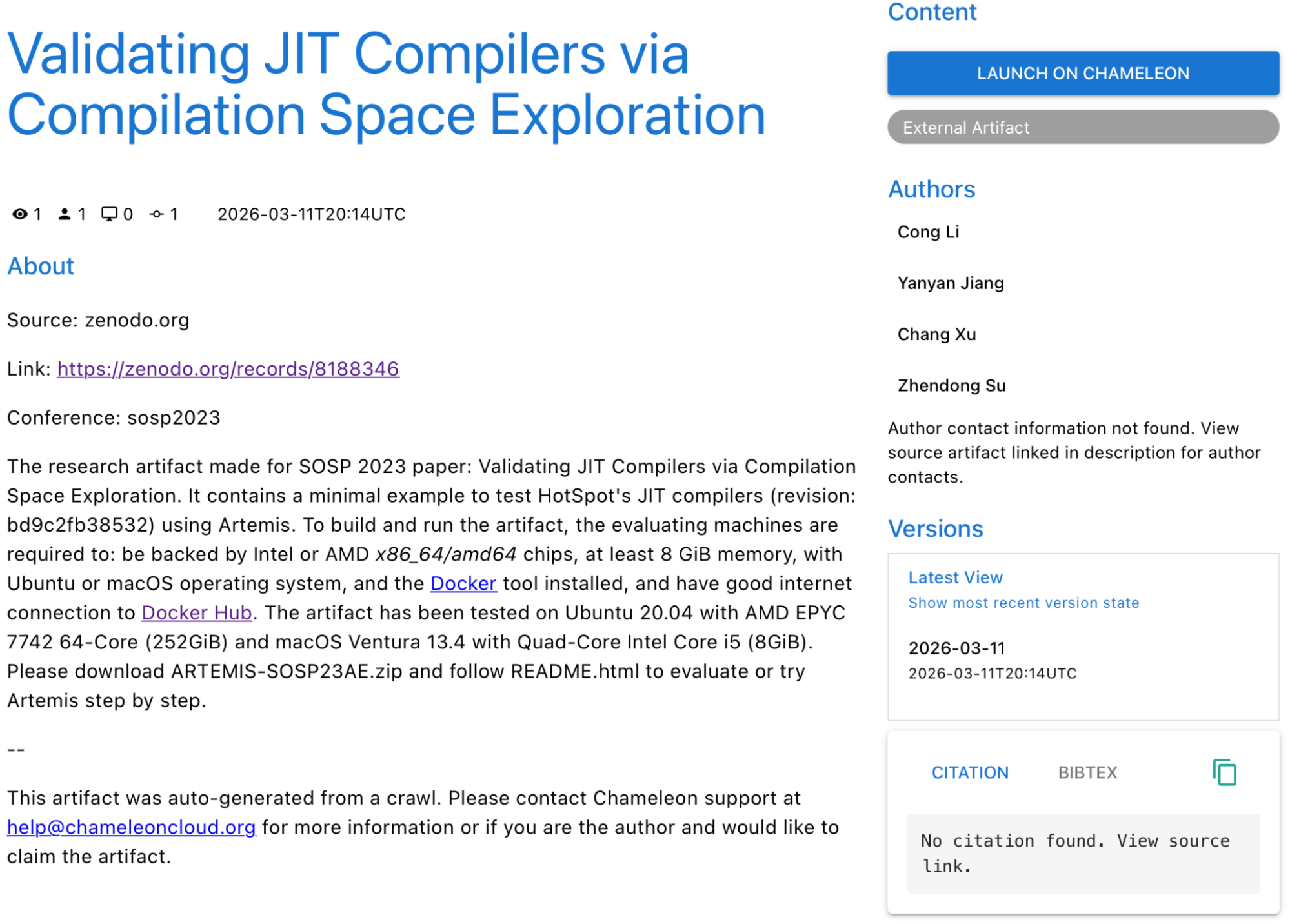
Example External Artifact in Trovi
External artifacts are clearly marked with a grey "External Artifact" badge (shown in the figure above) so you can distinguish them from artifacts created directly in Trovi. These artifacts contain the following:
- External Artifact label: Each entry includes an "External Artifact" badge
- Description and metadata: The artifact page shows what our crawl could infer, such as:
- A link to the artifact repository
- The conference or venue it was associated with, if applicable
- A brief description of the artifact
- Any author names that could be identified
- Provenance and claiming: At the bottom of the description, you'll see a note indicating that the artifact was discovered via a crawl. Authors are invited to contact us if they'd like to claim the artifact and manage it themselves on Trovi.
This keeps the original source and attribution intact while making external artifacts discoverable in the same interface you already use for native Trovi artifacts.
To give a sense of what is already available, some of the first external artifacts we've added include:
- Reducing Energy Bloat in Large Model Training (SOSP'24)
- Halfmoon: Log-Optimal Fault-Tolerant Stateful Serverless Computing (SOSP'23)
- ndzip-gpu: Efficient Lossless Compression of Scientific Floating-Point Data on GPUs (SC'21)
These and future external artifacts are being added from top conferences such as Supercomputing (SC), SOSP, EuroSys, and others.
Launching External Artifacts on Chameleon
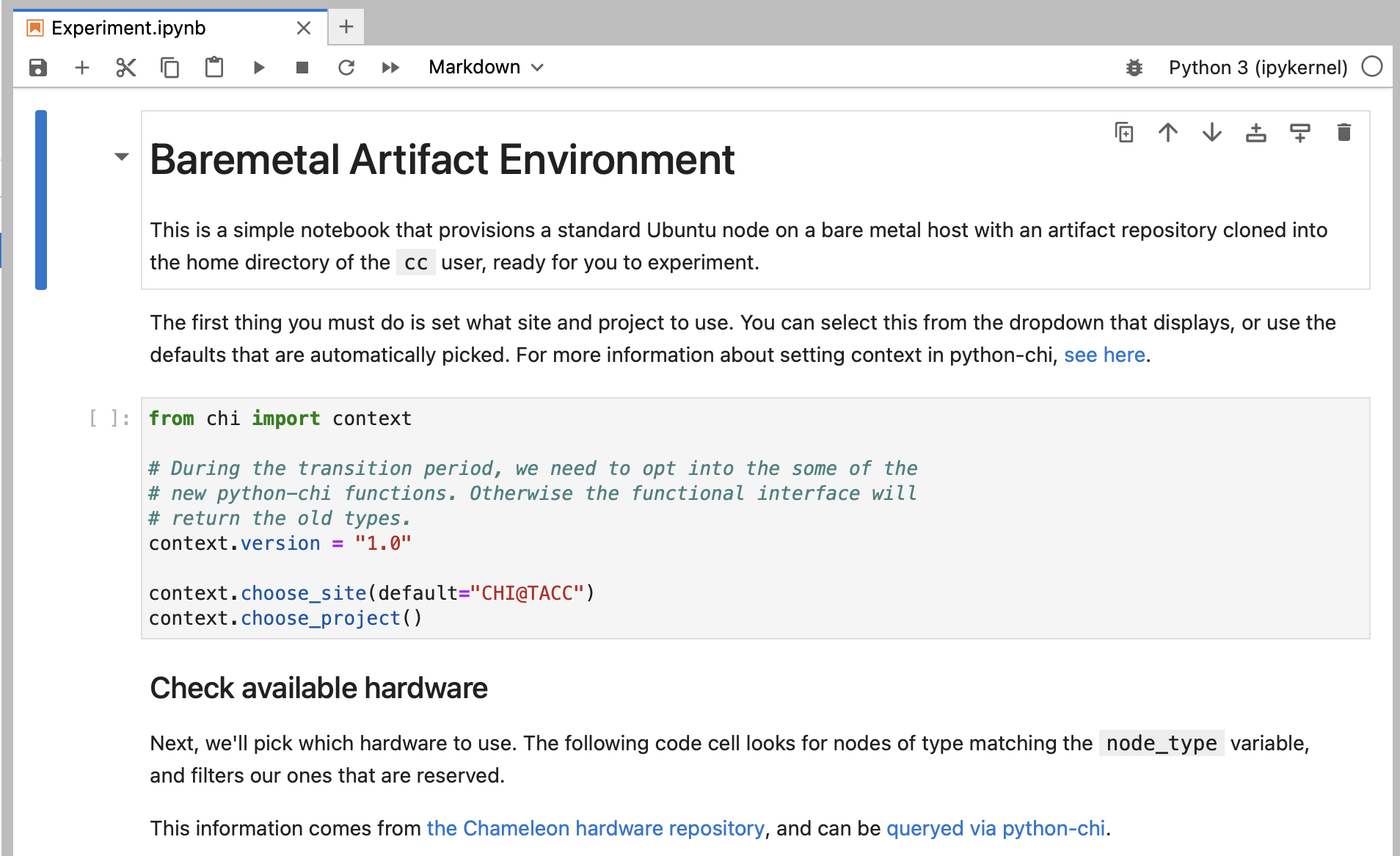
Jupyter notebook to launch an environment for an external artifact
External artifacts also include a launch option that ties them to actual hardware, with behavior tailored to their external nature. Integration with testbeds is accomplished with:
- Launch on Chameleon: Clicking the launch button provisions a notebook (shown in the figure above) that, when run, will set up a bare metal Ubuntu 24 system on Chameleon and clone the artifact's repository into it
- Single node baseline: This gives you a clean single-node Ubuntu environment with the code already in place, ideal for exploring artifacts and potentially reproducing any that work on a single Linux machine
- Manual setup for complex cases: For artifacts that require more complex setups — such as multiple nodes, different operating systems, or custom orchestration — you'll still need to follow the artifact's instructions to complete the configuration. If you do that for any artifacts, we'd love it if you turned your work into a Trovi artifact to provide a fully reproducible version for others in the community!
In other words, we are not rewriting external artifacts, but we are giving you a faster path from an interesting repository to running on a testbed.
Help Shape What Comes Next
This is an early phase of integrating external artifacts, and we'd like your help to guide it. If you're an author of an external artifact that now appears in Trovi, let us know if you'd like to claim it or add more details. If you manage to fully set up an external artifact, consider packaging it as a Trovi artifact so others can reproduce your configuration more easily. And if you know of other good reproducibility artifacts or repositories in the computer systems space, please share them on our forum post — we're actively looking for more sources to index.
Each external artifact added to Trovi is manually reviewed and approved by the Chameleon team, so you can expect these entries to appear gradually over time as we curate and validate them.
As always, if you have questions, run into any issues, or want to discuss how best to use external artifacts with Trovi and Chameleon, reach out to us via the Help Desk.